Automated Website Down Alert System🛑
An enthusiastic and determined AWS Cloud learner looking for positions in the IT industry with the goal of enhancing career to secure a challenging position in a reputable organization to expand my learnings, knowledge, and skills AWS, Linux, Python
Hey everyone! I built a simple automated system to monitor my website 24/7. AWS CloudWatch triggers a Lambda function every 5 minutes to check the site’s status. If it’s down, the function sends an alert through AWS SNS via email or SMS.All activity is logged in CloudWatch logs creating a simple and reliable downtime alert workflow and I never have to manually check my site again!
AWS Serverless Website Monitoring – Step-by-Step Setup Guide
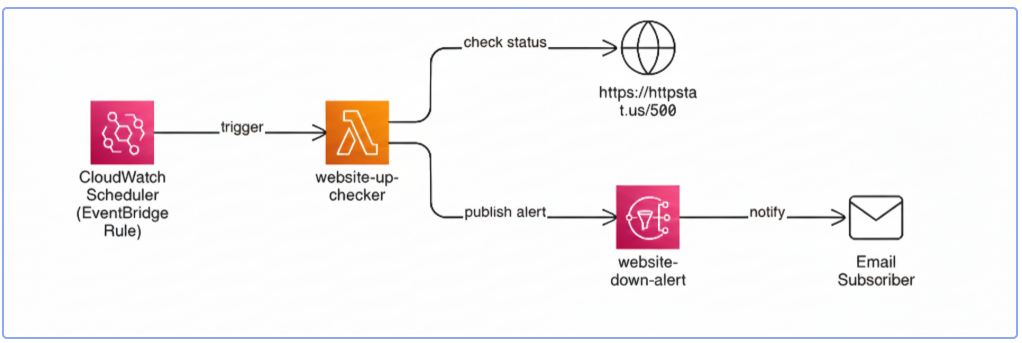
How it Works❓
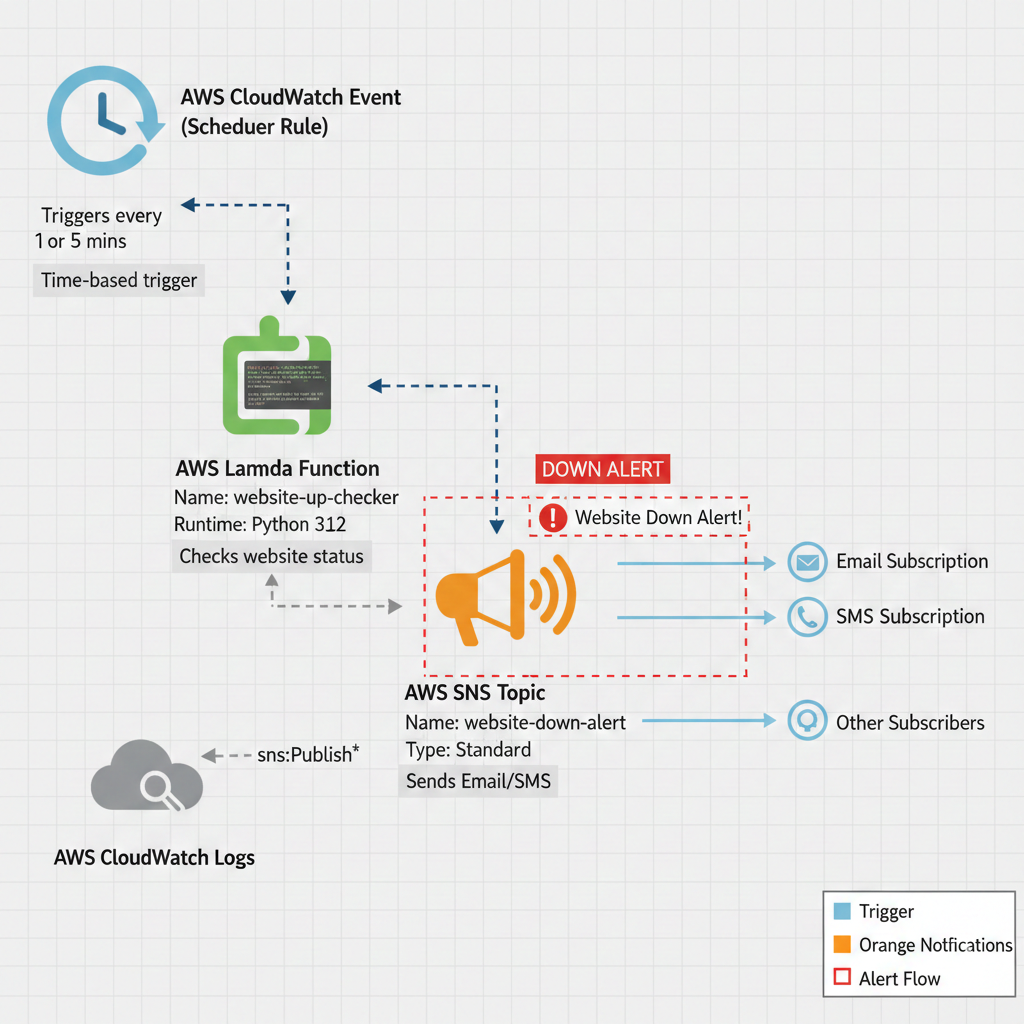
This guide walks you through creating a fully serverless website monitoring system using:
Amazon SNS — for email alerts
AWS Lambda — to check website health
Amazon EventBridge (CloudWatch Schedule) — to run checks periodically
IAM roles and policies — to grant necessary permissions
When your website goes down, the Lambda function you deploy will automatically send an email notification.
🟦 1. Create SNS Topic for Email Alerts
This SNS topic will send you an email whenever your website becomes unreachable.
Steps
Go to AWS SNS → Topics
Click Create topic
Type: Standard
Name:website-down-alertClick Create topic
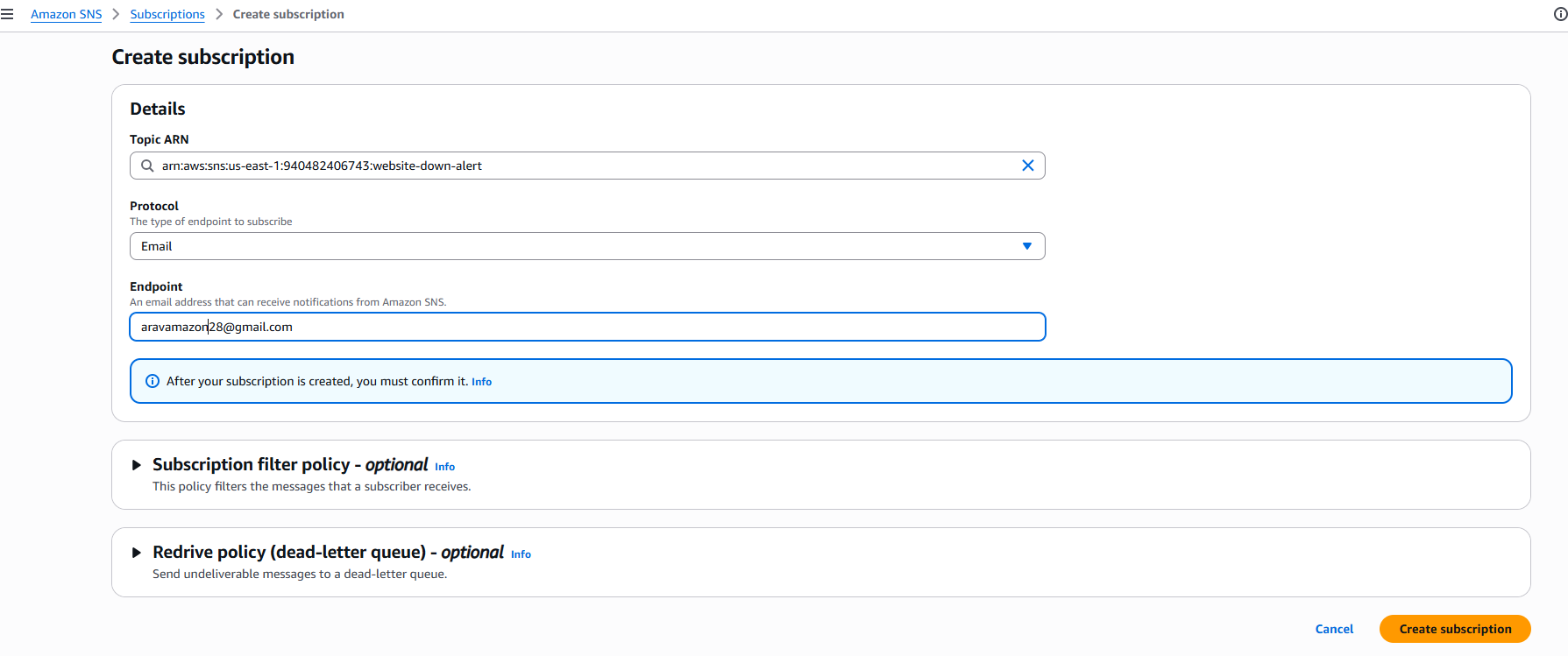
Open the topic → Subscriptions → Create subscription
Protocol: Email
Endpoint: your email address
Click Create subscription
Check your inbox and Confirm subscription
🟦 2. Create IAM Role for the Lambda Function
The Lambda function needs permissions to write logs and publish SNS alerts.
Steps
Go to AWS IAM → Roles
Click Create role
Trusted entity: AWS service
Use case: LambdaClick Next
Attach the policy:
- AWSLambdaBasicExecutionRole (provides CloudWatch Logs access)
Click Next
Role name:
lambda-website-checker-roleClick Create role
Add SNS Publish Permission
Open the newly created role
Go to Permissions → Add permissions → Create inline policy
Service: SNS
Actions:
PublishResources:
Choose Specific → paste your SNS topic ARN
(from the SNS topic details page)Name the policy:
SNSPublishAccessClick Create policy
🟦 3. Create Lambda Function to Check Website Status
This Lambda function will check your website and send an alert if the status is not 200 (OK).
Steps
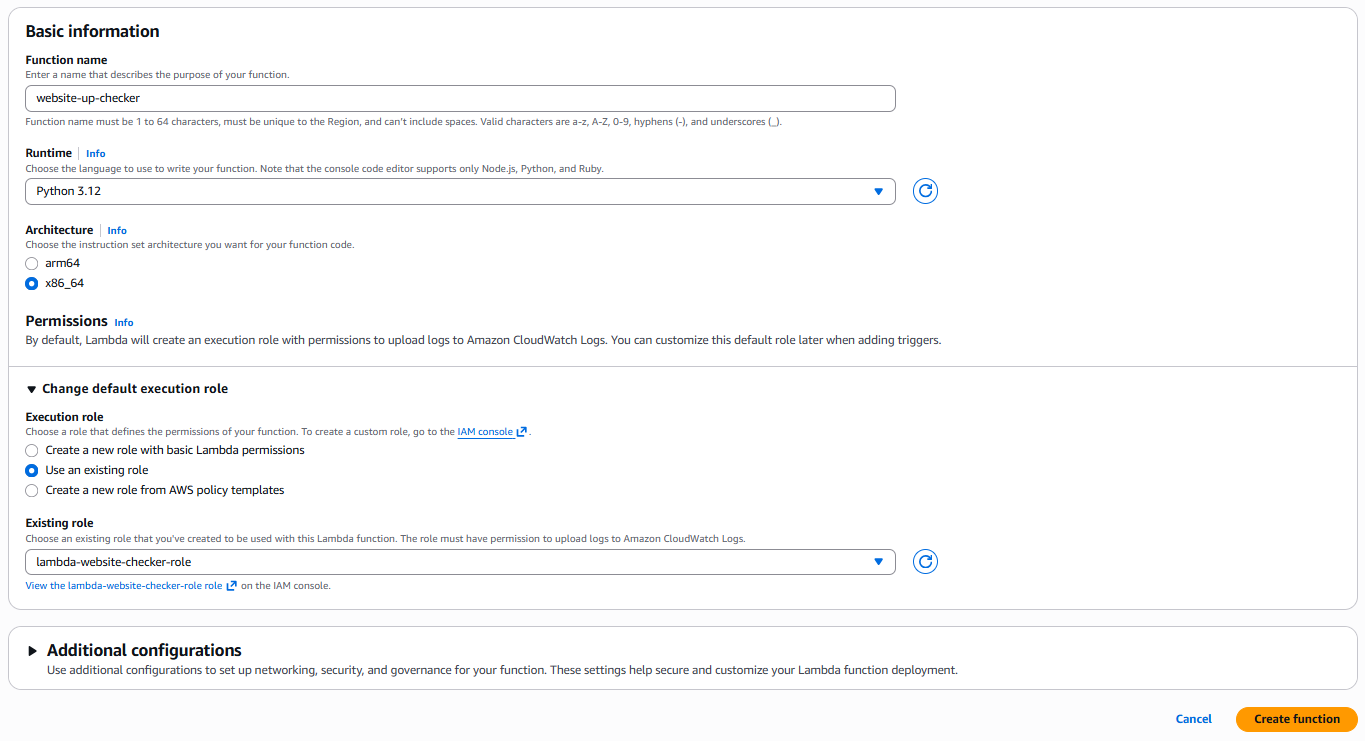
Go to AWS Lambda → Functions
Click Create function
Function name:
website-up-checker
Runtime: Python 3.12
Architecture: x86_64
Permissions:Choose Use an existing role
Select lambda-website-checker-role
Click Create function
Updated Lambda Code
In the Lambda Code editor, paste the following (after updating the two variables):
import urllib.request
import boto3

# 🚨 Configuration Variables - UPDATE THESE
# Replace YOUR_ACCOUNT_ID and AWS_REGION
SNS_TOPIC_ARN = "arn:aws:sns:us-east-1:940482406743:website-down-alert"
URL_TO_MONITOR = "https://httpstat.us/500" # Use a dummy URL for initial testing

def lambda_handler(event, context):
    try:
        # Check the URL, with a 5-second timeout
        response = urllib.request.urlopen(URL_TO_MONITOR, timeout=5)
        status = response.getcode()

        # Check if status is not the expected "UP" status (200)
        if status != 200:
            send_alert(f"Website returned unexpected status: {status}")
            return {"status": status}

        # If status is 200, the site is up, no alert is sent
        print(f"Website is UP, status: {status}")
        return {"status": status}

    except Exception as e:
        # Catch any exception (like timeout, connection error) and send alert
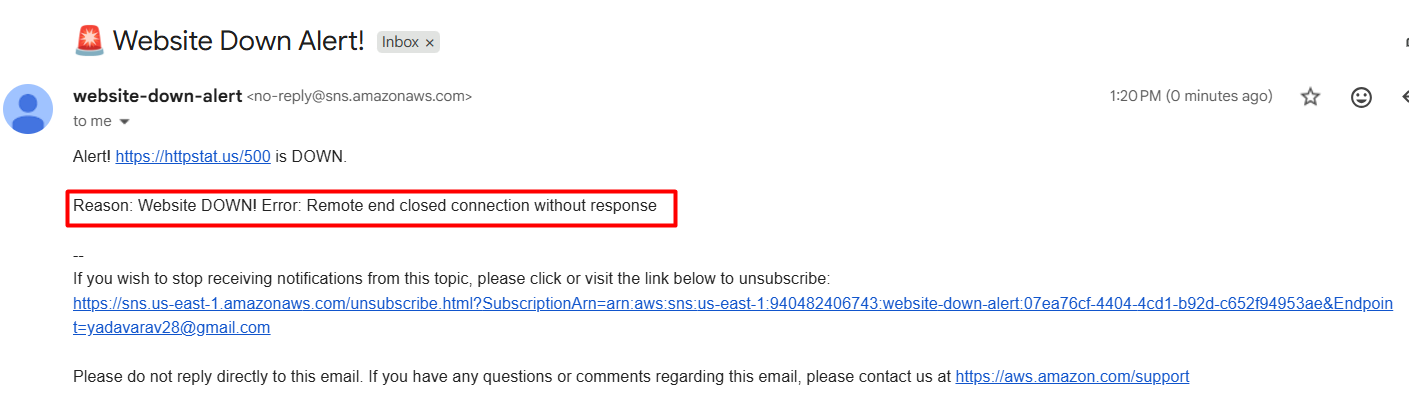
        send_alert(f"Website DOWN! Error: {str(e)}")
        return {"error": str(e)}

def send_alert(message):
    """Publishes a message to the specified SNS Topic."""
    sns = boto3.client("sns")
    sns.publish(
        TopicArn=SNS_TOPIC_ARN,
        Subject="🚨 Website Down Alert!",
        Message=f"Alert! {URL_TO_MONITOR} is DOWN.\n\nReason: {message}"
    )
Then click Deploy.
🟦 4. Schedule the Function Using EventBridge .
This triggers the Lambda function periodically to check the website.
Steps
Go to EventBridge → Schedules
Click Create schedule
Schedule name:
website-up-checker-scheduleSchedule pattern: Recurring schedule
- Rate: Every 5 minute (recommended)
Click Next
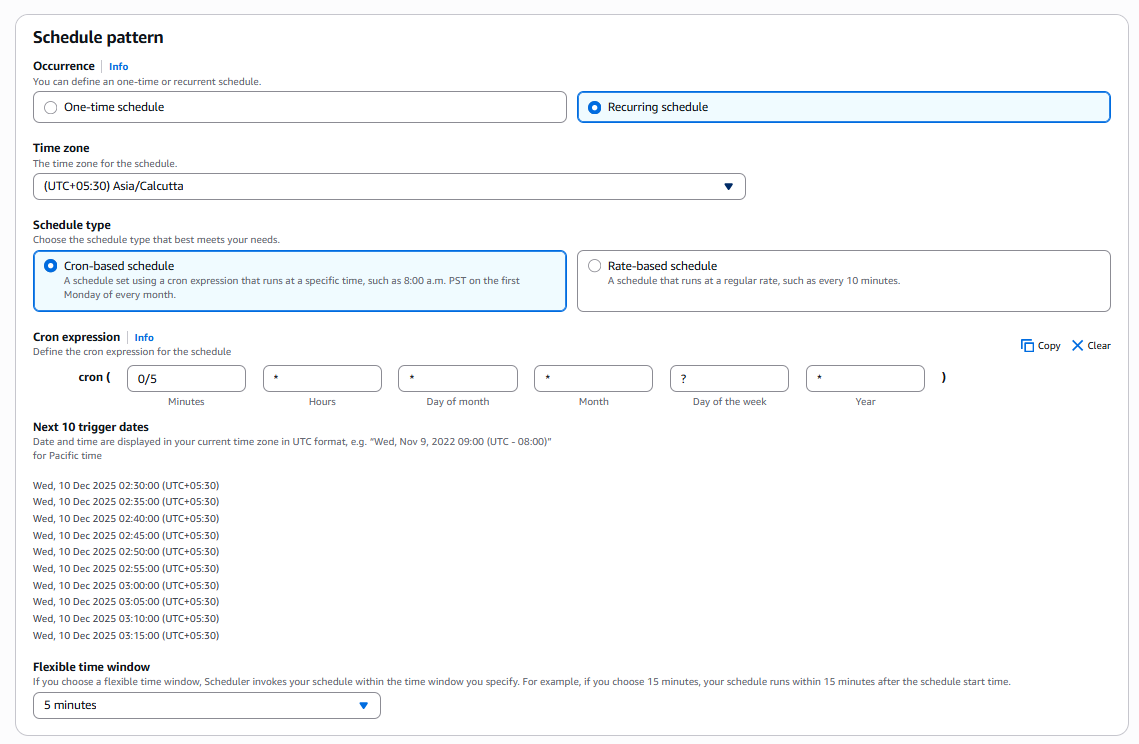
Target type: AWS service
Select a target: Lambda function
Function:website-up-checkerClick Next, review, then Create schedule
🚀 Your Monitoring System Is Now Live
Because the test URL (https://httpstat.us/500) always returns 500, you should receive an immediate email alert.
Once confirmed:
Return to the Lambda function
Update
URL_TO_MONITORto your real websiteClick Deploy

Your system is now monitoring your site automatically.